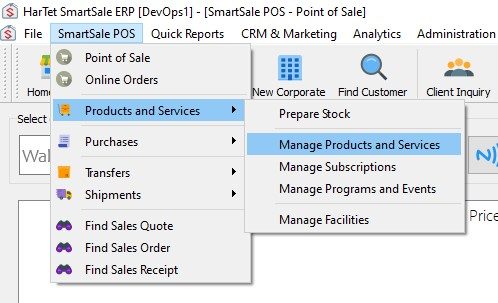
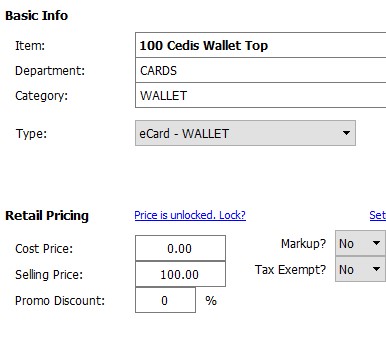
How to Add Money for Wallet Top-up Click on SmartSale POS, then move the cursor to Products and Services and then click on Manage Products and Services Enter the basic and retail information for the wallet top-up. Under type, choose eCard – WALLET Click Save Updated on August 22, 2022 Tagged: Wallet Top-up Was this article helpful? Yes No Related Articles Rotary District 9104 app – Getting Started Guide. How to Create a Proforma Invoice HOW TO MODIFY DETAILS OF PRODUCTS IN INVENTORY How to Make a Credit Sale How to Specify Additional Information to Appear on Sales Quotes How to Specify Additional Information to Appear on Sales Orders Need Support?Can't find the answer you're looking for? Don't worry we're here to help!CONTACT SUPPORT